fillmember.net 2014-2024
Constantly falling in and out of love with my personal website.
#indie-web
Intro
I've been building my own websites since I was around 9 years old, initially to show off the Pokémon MIDI files I had collected around the internet.
Around the time I graduated from university, I started building portfolio websites seriously, and I got the domain fillmember.net back then.
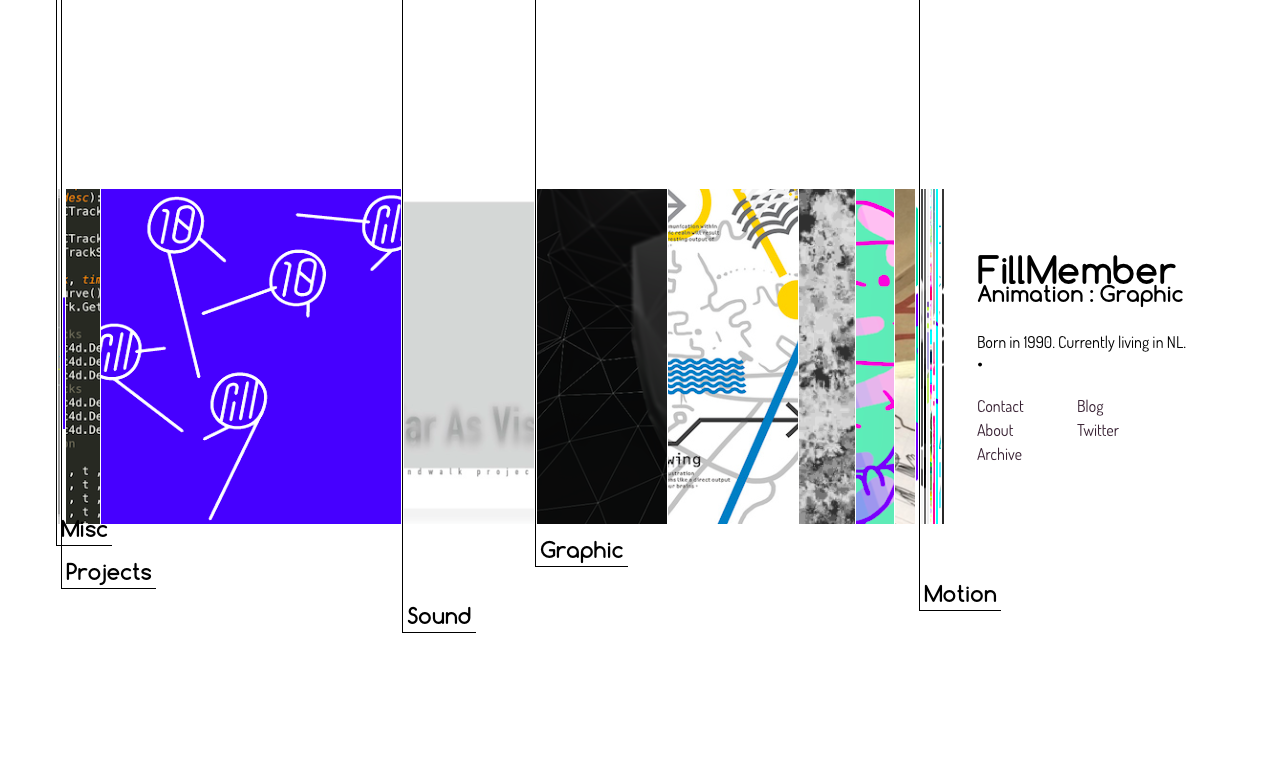
Websites like these did help me get into cool things and lots of opportunities came my way because of them. Designing and building websites for myself is fun every time, yet I would leave them untouched after a few months. Since 2019, when my career seemed stable and life started to have different priorities, I completely stopped building them (apart from a few mini sites for job applications). I even took the entire site down.
After a while, I realized I can't bar myself from putting things out there. Social platforms are great for the social aspect, but they usually focus on one medium, which is far from enough for me.
This time I am going to do something different and document the mistakes, pains and solutions I've found over the last few years.
The Problems with building a personal website
If I examine my experience with building websites over the last decades, my pains with this task can be summarized as:
Technology stopped being fun after a while.
Carefully crafting the website and curating its content takes a lot of time. I can enjoy it until it becomes repetitive plumbing and no longer feels like learning. At some point, I would start to miss other aspects of life.
Missing the work-life balance
I think I started to focus too much on showcasing my capabilities as a designer/developer with my website.
Of course, showing that I am able to build a website even in the internet climate nowadays is kind of the point of building a website.
However, treating the website as a professional showcase has somehow made it feel more like work, ruining the fun for me.
Unmanageably cool
This is more of a mindset problem.
Maybe as a way to justify my website existing apart from the easy-to-use platforms out there, I felt I needed to come up with a lot of cool stuff that wouldn't be possible elsewhere.
I can learn a lot building these seemingly cool things, but making them responsive and accessible takes just as much time. It can easily suck away a lot of time and energy I have on the project.
Another potential dead end is that I stop liking the things I am building because they have fallen out of trend, or out of my own taste. Even worse, in order to keep being cool, I have to curate the content differently. For example, it used to be considered cool to write as little as possible about design projects, and I gave in to that trend. It turned out this muted "minimal" approach doesn't make the archive feel complete, so it doesn't inspire me to keep going.
The Approach This Time
1. Showcase both serious work and personal stuff.
However unprofessional some people might find it, I feel this is the right way to build a website that fully embodies me as a person. It makes me more comfortable to publish things that feel less complete.
2. Minimal tech, as independent as possible.
This time, I won't budget for an awesome hosted headless CMS like Sanity, which I use at work. I would prefer a solution with fewer layers, fewer files to tweak and no passwords to remember. And the site should be servable on static hosting.
The IndieWeb movement inspired me a long time ago. I've seen a deck from people behind KirbyCMS proposing interesting ideas on the topic. Although I am not yet at the stage of considering the "connected" aspect of my website, I would love to build a site that is portable, and the content is in my control.
There will be another section about the specific tech choices later.
3. Build the cool things later.
Defer the visual effects and unconventional design until the amount of content can justify the extra investment. This doesn't mean the design can be suboptimal. I would still love to make the archive features complete and accessible.
Fortunately, bare-bone websites are more appreciated now.
The Right Stack
I like(?) to start my projects like this:
- struggle with things I use every day and should be pretty good at
- struggle with things with pretty good design and should be pretty easy to get into
Eventually I ended up with a basic Next.js stack, which I have used at work for more than 6 years. But it is a framework more designed to make performant web applications with advanced hosting options they'd like to sell you. For my website, I had to wrangle it into the direction of simplicity.
Flat-file CMS and revisiting PHP
I built my first portfolio with a CMS called Stacey, the first flat-file PHP CMS I got to know. The concept of a flat-file CMS is that each folder, holding a .txt file and its media assets, becomes a page. A flat-file CMS requires no database. It is truly portable and easy to author.
Kirby adopted the flat-file idea and turned it into a serious, powerful commercial product. Kirby ticks all the boxes:
- It can optimize images on the fly and cache them.
- It has a backstage environment called Panel for an even simpler on-the-go publishing experience.
- It can also be turned into a headless CMS, which was released at the perfect moment, when many of us were struggling to build React SPAs with a traditional CMS.
- It can generate static output that does not require a LAMP stack.
In fact, Kirby was the go-to CMS we used at work and for freelance projects during my time in Berlin.
However, within the first 30 minutes of setting up the PHP environment and writing my templates in PHP, I decided, with great sadness, that Kirby was not suitable for my project: the investment was somehow too high. Their license model is totally fair, but the problem lies on my side – time and tooling investment.
The PHP ecosystem has come a long way, but the developer experience of the Node ecosystem is still unrivaled. In order to use Kirby, I would have to write relatively less familiar PHP code without Visual Studio Code's out-of-the-box support. Auto-completion and IntelliSense are separate things to set up and even pay for.
Eventually I decided to try bending Next.js into a flat-file CMS.
How I turned Next.js into a flat-file CMS
Next.js also checks many boxes and the user experience is quite comparable to a Kirby setup.
Using MDX with the new App Router makes the experience even closer to a flat-file CMS.
- MDX allows me to write simple files in markdown that can be turned into pages by Next.js
- MDX allows me to write actual code whenever I want maximum control
- Next's App Router enables me to put media assets in the folder of the route. Previously with Pages Router, the assets need to be organized elsewhere.
After three days of tweaking and experimenting, I can author my content like this:
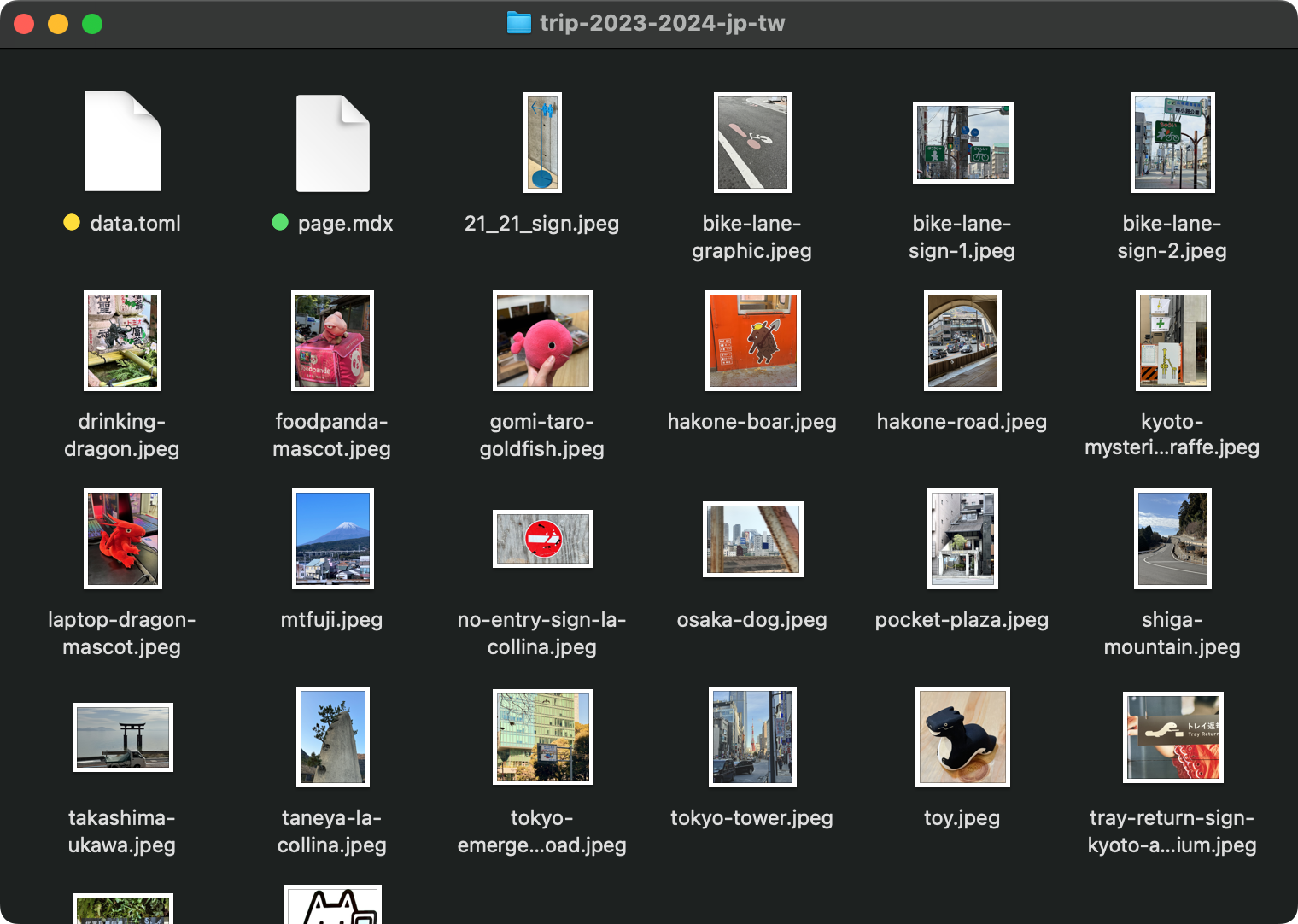
This image shows how I organize a "project" on my website, the content (page.mdx), metadata (data.toml), and assets (the images) are all in one folder.
The metadata file data.toml contains the data needed for listing them on the homepage.
# data.toml

title = "Trip to Japan and Taiwan"
description = "Pictures from the trip"

image = "/images/project-previews/trip-2023-2024-jp-tw.jpg"
selected = true
tags = ["travel"]
date = 2024-01-25
The content file page.mdx is a bit more involved:
import { ProjectLayout, pageDataToNextMetadata } from "@/components/base-layouts";
import data from "./data.toml"; // import the metadata via `@lcdev/toml-loader`

export default function Page(props) {
  return <ProjectLayout {...props} pageData={data} className="prose prose-xl max-w-none prose-img:mb-0" />;
}

export const metadata = pageDataToNextMetadata(data); // feed data into here for metadata for setting page title and other SEO purpose

## Markdown Content Starts here...
As seen above, the content file still ends up with some code in it for the layout and metadata. It is possible to move them out into an individual layout.tsx, but due to the need of importing a local ./data.toml file, they must be added in each project folder. Separating it into a different file is possible but does not really reduce the amount of repetitive code.
And then the project folder is placed directly within the app folder:
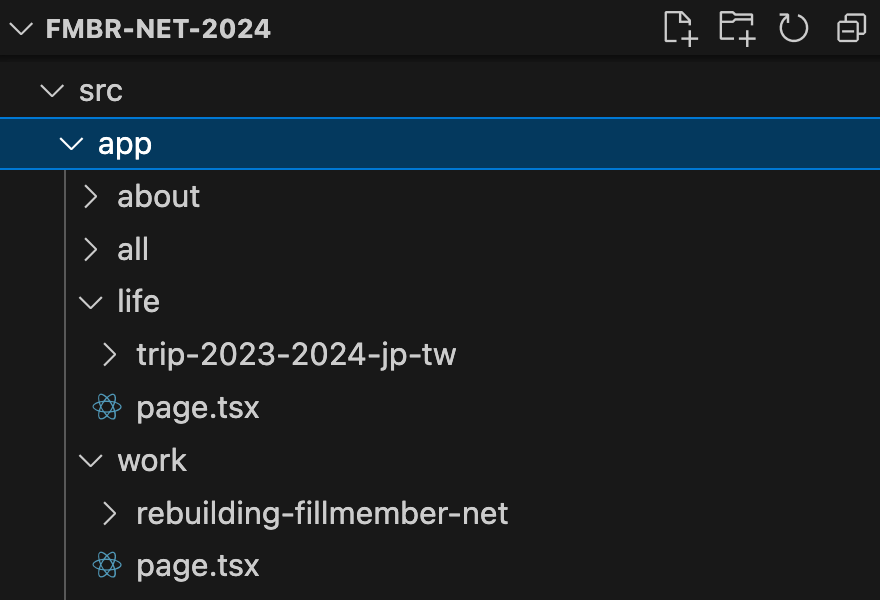
I have two categories "work" and "life" and each project sits in one of them.
For importing the images in MDX with simple Markdown syntax, I use rehype-mdx-import-media
// next.config.mjs

import createMDX from "@next/mdx";
import rehypeMdxImportMedia from "rehype-mdx-import-media";

const withMDX = createMDX({
  options: {
    rehypePlugins: [rehypeMdxImportMedia],
  },
});
I use next-image-export-optimizer for optimizing the images for static export. I feel one day Next.js might support this out of the box.
Conclusion
In general, I'm pretty happy with how this turned out. Having a proper setup turns out to be even more important than I initially thought. Without a setup I love using every day, it is hard to stay motivated to keep adding content and updating the website.
Using Next.js is staying in my comfort zone, but this is where I can focus on experimenting with more exciting things like react-three-fiber in the future.
It is still too early to say how long I will keep treating this website as my happy place. I've learned the importance of documentation and how it is one of my favorite activities. Judging by how much I just wrote about building it in the early stage of the project, I feel like it will be an important place for me to organize my thoughts.